I just updated my Graduate Web Page at http://cs.uga.edu/~krishna
It was a good learning experience to come up with some decent color combinations. I used online color picker tools, well I dont have the link for the tools I used, but here is one good article that gives interesting insights on color-combinations.
http://www.limov.com/colour/schemes.lml
I developed a similar tool in ASP.NET, first using non-AJAX approach and then made the application an AJAX one. It was a great feeling to develop an AJAX application and trust me, with ASP.NET AJAX, we can develop AJAXify any web application in no time and absolutely zero coding.
Here is what I did!
1. First I created a User Control, which had the pallette selection. Then drag and drop ScriptManager control and UpdatePanel on a new ASPX page.
2. Drag and drop the User Control you just created into the Update Panel.
3. Compile and run! all the changes in the page are ajaxified!!!
Absolutely no coding!!!!
I always felt that I lacked good color scheme selection ability, but now with my own tool, I can select a variety of themes!!!
I hope I have some online ASPX Web Hosting service. I intend to buy an ASPX portal very soon and then I can upload the tools I make once a while!
Thursday, May 24, 2007


Saturday, April 07, 2007
Research for Summer
With may 10th 2006, the first term with UGA will come to an end. Then I am planning to move on and work on GWT and ASP.NET. And as for my thesis, I am planning to work on P2p Media Streaming - especially I would like to study and enhance the current p2p media streaming networks and come up with something really good enough for my thesis. Hopefully I would stand on this and work further to bring up something good.
Just got few books on p2p computing in java and .NET, also the core technology book to study the underlying systems. Have to wait and see if this plan of mine will work!
Just got few books on p2p computing in java and .NET, also the core technology book to study the underlying systems. Have to wait and see if this plan of mine will work!
Thursday, March 29, 2007
Mean Shift Tracking in Java
After long long attempts to learn - understand the Mean Shift tracking, I have finally implemented the Kernel Based Object Tracking in Java. First I have tried to implement the tracker in openCV but I had some problems with the rectangle selection(the bounding box) so I moved back to Java and implemented the code offline using Java Media FrameWork. I have written a nice small class using JMF which we can use to extract frames out of a given Video file. There is no support for WMV format - it says NoPlayerException and some DivX formats, but then most of the files were played successfully.
My tracking results are shown below. Shown are the first, 19th and the 10th frame of a striker - video courtesy "WEB".
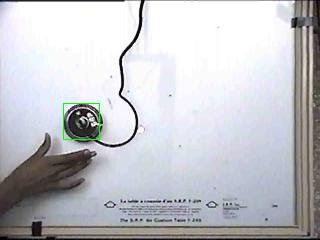
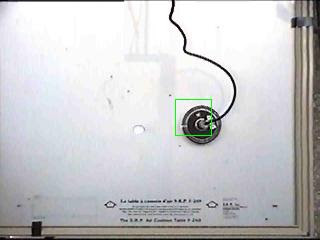
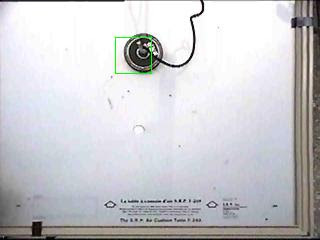
My tracking results are shown below. Shown are the first, 19th and the 10th frame of a striker - video courtesy "WEB".


Monday, March 12, 2007
asp.net 2.0 - fun to learn
I have just started working on ASP.NET 2.0 again after a long long time. Its been almost an year since I did some serious coding and I want to get myself updated with the latest - asp.net 2.0.
I decided to use the Core ASP.NET reference book from MS Press and have been going through fundas like the IIS 6.0 Process model, HttpRuntime queue and so on.
How to detect the browser programatically in ASP.NET?
---------------------------------------------------------
You have the Request object with you. You can access the Request object either directly or from the HttpContext object. To detect the browser you are running ....
Dim browser as String = HttpContext.Current.Browser.Browser
For IE, browser would be "IE" and for firefox, its Firefox.
More about the HttpContext....
Actually, ProcessRequest method is called on the HttpRuntime object when a request arrives. Just before it serves a page to the request, a "context" is created which could be accessed through the HttpContext object. The HttpRuntime object uses the HttpContext object to locate or create a Web App object that is capable of handling a request it gets. There is an internal object that will be used to do the search - HttpApplicationFactory which maintains a pool of HttpApplication objects to serve incoming http requests. The HttpApplication is the base class that represents a running ASP.NET application. It is this object that determines what kind of a handler is needed - basically it decides what kind of resource is being requested - whether its a web page being asked for or a web server or a server control, etc.
Page Class and important members
-----------------------------------
The following is the list of important members of the Page class.
From my past experience coding ASP.NET web apps, one most important thing that a newbie should always learn is the Page life cycle. By Life cycle in an application programming model, we basically mean what events are fired at what time. The ordering of events become very essential especially when the application grows. Knowing where to put initialization code, where to add controls dynamically, etc will help us code better applications.
The ASP.NET Web Page life cycle is given below.
ASP.NET 2.0 Page Life cycle
http://www.robincurry.org/blog/content/binary/o_aspNet_Page_LifeCycle.jpg
I will post more as I get deep into the subject. I plan to devote an hour a day once the spring break is over.
This is what I think I will/should be doing
1. Core ASP.NET 2.0
2. Data binding with ASP.NET 2.0 and ofcourse ADO.NET
3. ATLAS / ASP.NET AJAX.
Then may be I can get hands-on with XAML,WPF,WCF,Windows Workflow...Gosh there is a lot to learn....
I decided to use the Core ASP.NET reference book from MS Press and have been going through fundas like the IIS 6.0 Process model, HttpRuntime queue and so on.
How to detect the browser programatically in ASP.NET?
---------------------------------------------------------
You have the Request object with you. You can access the Request object either directly or from the HttpContext object. To detect the browser you are running ....
Dim browser as String = HttpContext.Current.Browser.Browser
For IE, browser would be "IE" and for firefox, its Firefox.
More about the HttpContext....
Actually, ProcessRequest method is called on the HttpRuntime object when a request arrives. Just before it serves a page to the request, a "context" is created which could be accessed through the HttpContext object. The HttpRuntime object uses the HttpContext object to locate or create a Web App object that is capable of handling a request it gets. There is an internal object that will be used to do the search - HttpApplicationFactory which maintains a pool of HttpApplication objects to serve incoming http requests. The HttpApplication is the base class that represents a running ASP.NET application. It is this object that determines what kind of a handler is needed - basically it decides what kind of resource is being requested - whether its a web page being asked for or a web server or a server control, etc.
Page Class and important members
-----------------------------------
The following is the list of important members of the Page class.
- Application - instance of HttpApplicationState
- Cache - instance of Cache class, implements cache for an asp.net application
- Request - instance of HttpRequest
- Response - instance of HttpResponse
- Server - instance of HttpServerUtility, helper method for processing web requests.
- Session - instance of HttpSession.
- Trace - instance of TraceContext, used for tracing.
- User - represents the current user whose request is being processed.
From my past experience coding ASP.NET web apps, one most important thing that a newbie should always learn is the Page life cycle. By Life cycle in an application programming model, we basically mean what events are fired at what time. The ordering of events become very essential especially when the application grows. Knowing where to put initialization code, where to add controls dynamically, etc will help us code better applications.
The ASP.NET Web Page life cycle is given below.
- PreInit
- Init
- InitComplete
- View State is now restored
- Posted data is processed
- PreLoad event is fired
- Load event is raised
- LoadComplete (in between few events for handling postback is taken care of)
- PreRender
- PreRenderComplete
- SaveStateComplete
ASP.NET 2.0 Page Life cycle
http://www.robincurry.org/blog/content/binary/o_aspNet_Page_LifeCycle.jpg
I will post more as I get deep into the subject. I plan to devote an hour a day once the spring break is over.
This is what I think I will/should be doing
1. Core ASP.NET 2.0
2. Data binding with ASP.NET 2.0 and ofcourse ADO.NET
3. ATLAS / ASP.NET AJAX.
Then may be I can get hands-on with XAML,WPF,WCF,Windows Workflow...Gosh there is a lot to learn....
Sunday, February 04, 2007
Makefile to compile java programs
The following is the makefile to compile java programs:
all: | remove_classes ProxyServer.class
remove_classes:
rm -f *.class
ProxyServer.class: ProxyServer.java
javac ProxyServer.java -nowarn
The order of execution of jobs within the makefile can be normal or we can specify the order. The jobs listed after the pipe (|) are all orderly, as mentioned above.
all: | first second third
Makefile can be executed as:
> make
If target-name is omitted, then the first job is run. So in the first job, we name it as "all" and then there we specified the jobs it should run, along with the order. It is simple to understand that the current make file removes all old class files and then compiles the java program to get the latest class files. Though this is not needed, as javac would update the class files, this simple example helps us to understand "make".
Have fun!
all: | remove_classes ProxyServer.class
remove_classes:
rm -f *.class
ProxyServer.class: ProxyServer.java
javac ProxyServer.java -nowarn
The order of execution of jobs within the makefile can be normal or we can specify the order. The jobs listed after the pipe (|) are all orderly, as mentioned above.
all: | first second third
Makefile can be executed as:
> make
If target-name is omitted, then the first job is run. So in the first job, we name it as "all" and then there we specified the jobs it should run, along with the order. It is simple to understand that the current make file removes all old class files and then compiles the java program to get the latest class files. Though this is not needed, as javac would update the class files, this simple example helps us to understand "make".
Have fun!
Setting path variables in Linux permanently
Recently I have installed Linux Ubuntu on my laptop on top of Virtual PC. There is a very good post on how to do this at this link:
http://arcanecode.wordpress.com/2006/12/19/installing-ubuntu-on-virtualpc-step-by-step/
Then I had installed Eclipse and JAVA 1.5 on the new linux workstation! I wanted to work out a few programs on the linux platform.
When you start the terminal in Ubuntu and type "java -version", it displays the version but as you notice down it is not the Sun HotSpot VM that is running but is the GCJ, a free java compiler which doesnt actually interpret. So you would like to change the system to use the Java VM you installed. For that the obvious way is to change the Path variables for JAVA_HOME and PATH.
You can set a path variable using "export" command as :
export JAVA_HOME=/opt/jdk1.5.0_11
export PATH=$JAVA_HOME/bin:$PATH
When we set PATH variable, we should not forget to append already existing path variables( using :$PATH).
Now when you type "java -version", you can see your Java VM as HotSpot one. But then close the terminal and open it again.
Again try the "java -version", you will find your settings to be gone! What happens is that your settings were temporary and effective only for the terminal window that was launched and path set. In order for the variables to be effective for the user throughout the sessions, you should edit the bashrc script.
You can set environment variables permanently for a given user by changing the bashrc:
>pico ~/.bashrc
This opens the bashrc for you. Paste the two lines of "export" i mentioned earlier. Make sure you give the path of your JDK properly.
Save the changes and exit.
Now type
>source ~/.bashrc
This updates the changes made the new variables have been set. To test your settings you can now type:
"which java" and it should display the path of the java compiler that is being use( the one you set in the bashrc).
I am trying to find out how to set variables to reflect on all the user accounts !!! Let me know in case you guys know how to!
http://arcanecode.wordpress.com/2006/12/19/installing-ubuntu-on-virtualpc-step-by-step/
Then I had installed Eclipse and JAVA 1.5 on the new linux workstation! I wanted to work out a few programs on the linux platform.
When you start the terminal in Ubuntu and type "java -version", it displays the version but as you notice down it is not the Sun HotSpot VM that is running but is the GCJ, a free java compiler which doesnt actually interpret. So you would like to change the system to use the Java VM you installed. For that the obvious way is to change the Path variables for JAVA_HOME and PATH.
You can set a path variable using "export" command as :
export JAVA_HOME=/opt/jdk1.5.0_11
export PATH=$JAVA_HOME/bin:$PATH
When we set PATH variable, we should not forget to append already existing path variables( using :$PATH).
Now when you type "java -version", you can see your Java VM as HotSpot one. But then close the terminal and open it again.
Again try the "java -version", you will find your settings to be gone! What happens is that your settings were temporary and effective only for the terminal window that was launched and path set. In order for the variables to be effective for the user throughout the sessions, you should edit the bashrc script.
You can set environment variables permanently for a given user by changing the bashrc:
>pico ~/.bashrc
This opens the bashrc for you. Paste the two lines of "export" i mentioned earlier. Make sure you give the path of your JDK properly.
Save the changes and exit.
Now type
>source ~/.bashrc
This updates the changes made the new variables have been set. To test your settings you can now type:
"which java" and it should display the path of the java compiler that is being use( the one you set in the bashrc).
I am trying to find out how to set variables to reflect on all the user accounts !!! Let me know in case you guys know how to!
Thursday, October 12, 2006
Crank! I will watch that soon!
This article supposedly will help good developers develop good design for their websites. I have always had this problem. I always felt I lacked this "good designing capability".
http://peterkellner.net/2006/08/28/msprofcsshowto/
I did not go through it yet. But once I am home I would study that and make some observations.
http://peterkellner.net/2006/08/28/msprofcsshowto/
I did not go through it yet. But once I am home I would study that and make some observations.
Speed launch of Studio products
Its been around 6 months since I used Visual Studio and worked on any .NET application. So I am having problem of amensia - memory loss!! :D I have been using the /nosplash option with Visual Studio since long, since I started real coding on .NET! But sitting idle in my office and browsing the internet, it took me a long time to recall "what was the option that I used to quickly launch Visual Studio?". It is the "/nosplash option, which you can give in the TARGET of your Visual Studio project. For example, you can launch the Visual Studio from Start->Run and type "devenv". You can see the usual Splash screen. Its very elegantly designed, but still I dont want to see it everytime I start Visual Studio(I used to launch Visual Studio around 20-30 times a day!) So you can use this handy tip. Type
"devenv /nosplash" and press enter. And Splash!!! your Visual Studio is straight up! and working fine!
This post is just to make sure that incase I forget that myself, I know where to look out !
"devenv /nosplash" and press enter. And Splash!!! your Visual Studio is straight up! and working fine!
This post is just to make sure that incase I forget that myself, I know where to look out !
Signing a weak assembly in .NET 2.0
Just came across this post on MSDN Blogs. It says "Signing an unsigned assembly in .NET 2.0". Usually I dont find such things interesting, but gone are those student days and being a professional, there are some "corporate" things to be learnt. So recently I borrowed a book from library "Introducing .NET Framework" by O'Rielly. It was an old book, dated .NET 1.0 beta 2 release!! but still I felt I learnt a lot of new details regarding .NET Framework, especially about the CLR and stuff like that. So I found this one interesting. I have made some notes which I would post it in the future.
For now, take a look at this.
http://blogs.msdn.com/neerajag/archive/2006/10/12/signing-a-existing-net-assembly.aspx
For now, take a look at this.
http://blogs.msdn.com/neerajag/archive/2006/10/12/signing-a-existing-net-assembly.aspx
Wednesday, October 11, 2006
Height of Sincerity!
well the title would not make any sense for another two to three days. Thanks to my colleagues that I am nominated for the Best Learner and Best Guide awards for the FLP batch. Friday, the 13th! is a big day for us, FLPites. Its our Graduation day and the day when we get a hint of our "what next?"
Old habits die hard and my taste for .NET still remains. So I often keep browsing about Microsoft and .NET. In that process I read some excellent blogs. One such blog is here. Its an index of Various "How-to-deploy" on Visual Studio. It is a must-look!
http://blogs.msdn.com/astebner/articles/574618.aspx
I would not change the heading of my blog. But I would like to post few comments on the currently technology I am working on! Surprisingly, inspite of not liking the platform, I am doing pretty well on Mainframes! As a developer who fine tuned his programming skills among OBJECTS, working on COBOL, developing applications with CICS appears awful. But still, you have to do it.
One thing that we should appreciate about coding Cobol on Mainframes is, with the tools I used so far, I now feel that I can survive coding without the help of Visual Studio or Eclipse or any IDE for that matter. If you can manage a project on TSO, trust me, you can do wonders with Visual Studio and other IDEs.
There is a lot to learn about Mainframes - CICS, COBOL and JCL! But still somehow I feel I dont belong here. I plan to move to .NET professionally too....
More insights later. I also plan to post tips/guide for mainframe beginners! Now - I aint a beginner anymore and I do have valuable suggestions and tips on Mainframes too!
Old habits die hard and my taste for .NET still remains. So I often keep browsing about Microsoft and .NET. In that process I read some excellent blogs. One such blog is here. Its an index of Various "How-to-deploy" on Visual Studio. It is a must-look!
http://blogs.msdn.com/astebner/articles/574618.aspx
I would not change the heading of my blog. But I would like to post few comments on the currently technology I am working on! Surprisingly, inspite of not liking the platform, I am doing pretty well on Mainframes! As a developer who fine tuned his programming skills among OBJECTS, working on COBOL, developing applications with CICS appears awful. But still, you have to do it.
One thing that we should appreciate about coding Cobol on Mainframes is, with the tools I used so far, I now feel that I can survive coding without the help of Visual Studio or Eclipse or any IDE for that matter. If you can manage a project on TSO, trust me, you can do wonders with Visual Studio and other IDEs.
There is a lot to learn about Mainframes - CICS, COBOL and JCL! But still somehow I feel I dont belong here. I plan to move to .NET professionally too....
More insights later. I also plan to post tips/guide for mainframe beginners! Now - I aint a beginner anymore and I do have valuable suggestions and tips on Mainframes too!
Friday, September 29, 2006
After a long time
Well hi to those non-existent visitors of my blog ! :)
Lots of work got updated on the Microsoft development front(in my unfortunate absence). Anyway this post is to just store a link about UpdateControl, an aTlas how-to. Wonderful job done, i find it pretty soothing as i have just completed reading Atlas At Last:MSDN Mag article. Take a look at the how-to :
http://blogs.msdn.com/trobbins/articles/678575.aspx
Wish I had a PC at the place I stay :(
Lots of work got updated on the Microsoft development front(in my unfortunate absence). Anyway this post is to just store a link about UpdateControl, an aTlas how-to. Wonderful job done, i find it pretty soothing as i have just completed reading Atlas At Last:MSDN Mag article. Take a look at the how-to :
http://blogs.msdn.com/trobbins/articles/678575.aspx
Wish I had a PC at the place I stay :(
Wednesday, May 03, 2006
Step by step guide to Web Services
Firstly, this is no documentation for Web Services and neither do i wish to make any. I dont discuss any inernals on how web services work. It is just a step-by-step guide to develop Web Services and consuming them in .NET. I prefer VB.NET for this tutorial. I use layman terms and if you have some problem with my language, visit MSDN and learn-dont bother to visit again.
What are Web Services??
I would say a Web Service is a DLL that is referenced through the internet using HTTP protocol. Instead of shipping your business logic along with the application, as a DLL, we can make it a web service and host it as a website. But all it does is to provide the same services as a DLL - i.e no presentation involved.
How to create a web Service?
1. Start Visual Studio 2003. Go to VB Projects -> ASP.NET Web Service -> Give a project name and click OK.
2. Click on Switch to code view on the designer view you get. We dont need a designer so we go to the code view.
3. You can notice a Hello World method commented. Copy the same and paste it and this time uncomment it. That is your code file should look like this.
_
Public Class Service1
Inherits System.Web.Services.WebService
#Region " Web Services Designer Generated Code "
' WEB SERVICE EXAMPLE
' The HelloWorld() example service returns the string Hello World.
' To build, uncomment the following lines then save and build the project.
' To test this web service, ensure that the .asmx file is the start page
' and press F5.
'
' _
'Public Function HelloWorld() As String
' Return "Hello World"
'End Function
<WebMethod()>
Public Function HelloWorld() As String
Return "hello world"
End Function
End class
4. Ok your web service is ready. Just "Build" the project clicking on CTRL + f5). It starts up IE showing a sample page. That looks like the one shown below!
What are Web Services??
I would say a Web Service is a DLL that is referenced through the internet using HTTP protocol. Instead of shipping your business logic along with the application, as a DLL, we can make it a web service and host it as a website. But all it does is to provide the same services as a DLL - i.e no presentation involved.
How to create a web Service?
1. Start Visual Studio 2003. Go to VB Projects -> ASP.NET Web Service -> Give a project name and click OK.
2. Click on Switch to code view on the designer view you get. We dont need a designer so we go to the code view.
3. You can notice a Hello World method commented. Copy the same and paste it and this time uncomment it. That is your code file should look like this.
Public Class Service1
Inherits System.Web.Services.WebService
#Region " Web Services Designer Generated Code "
' WEB SERVICE EXAMPLE
' The HelloWorld() example service returns the string Hello World.
' To build, uncomment the following lines then save and build the project.
' To test this web service, ensure that the .asmx file is the start page
' and press F5.
'
'
'Public Function HelloWorld() As String
' Return "Hello World"
'End Function
<WebMethod()>
Public Function HelloWorld() As String
Return "hello world"
End Function
End class
Service1
The following operations are supported. For a formal definition, please review the Service Description.
HelloWorld
5. Click on the "HelloWorld" and you are taken to a page that has the SOAP Headers and HTTP Post descriptions along with a Invoke button. Click on the "Invoke" button. the output you get is as follows.<xml version="1.0" encoding="utf-8" ?>
<string> xmlns
<string> xmlns