Showing posts sorted by relevance for query swt. Sort by date Show all posts

Saturday, September 15, 2007

Configuring SWT Browser Widget Preferences!

This technique I discovered works on Linux, ie. when SWT Browser uses Mozilla as its underlying browser. It uses JavaXPCOM to connect with Mozilla and does great job doing so. But then the Browser class do not have any options to configure the preferences of the browser. But you can still configure the preferences of the browser!!
Mozilla preferences are stored in a .mozilla directory for each user, in their home directory. Thanks to Dr. Li, that I could find this out. Now if you run a program that uses SWT Browser, you can see a a folder "Eclipse" inside this .mozilla directory.

[Note I am talking about running a Java Program which has SWT Browser, from ECLIPSE, thus the folder name is eclipse. If you run from console, you might have a different foldername(I guess as that of the program name)]
It is in the /home//.mozilla/eclipse directory that the SWT Browser used Mozilla preferences are stored. It is stored in the prefs.js javascript file. You can specify a user prefernces by using user_pref() function. For example, you want a network boosted SWT Browser widget, then may be you can add the following line to prefs.js
user_pref("networking.http.pipelining",true);
Close Eclipse and start again. Now when you launch the program, the browser would use this preference.
Another way is to use "about:config" within your program do the configuration!
For this you can just write a configure() function and use it when you want. The function can be something like
Class ConfigurationWindow
{
public void configure()
{
Display display = new Display();
Shell shell = new Shell(display);

Browser browser = new Browser(shell,SWT.CENTER);

shell.setLayout(new GridLayout());

browser.setUrl("about:config");

shell.open();

while(!shell.isDisposed())
if(!display.readAndDispatch()) display.sleep();

shell.dispose();
display.dispose();
browser.dispose();
}
}

Now you can create new instance of ConfigurationWindow and call configure() which shows the user preferences window, just like the one you get when you type about:config in Mozilla Firefox.
This way one can configure preferences for Swt Browser Widget!

Friday, September 14, 2007

BUG in SWT Browser Widget

I have just discovered a bug in SWT Browser Widget which is used by Eclipse for its internal browser. Just type in http://www.friendster.com/ anyway inside eclipse (some editor inside eclipse). Hold CTRL and click on that link to open Eclipse internal browser. As the page is about to finish loading, Eclipse closes!!
The version I am using is SWT 3.3, the latest, so called stable release.
No idea as of now why this is happening. I guess there is some component inside friendster.com homepage that SWT Browser widget does not like much, and infact it is a VM error!
By the way I am running Fedora Core 7.

Tuesday, January 08, 2008

Configuring SWT Browser Preferences (2)

In one of my previous posts, I blogged about the way one could set SWT Browser Widget Preferences and there has been a comment on my blog!!! (well apart from the comments that my friend Suri makes)
The comment has rightly pointed out to a way that one could programatically set the preferences of SWT Browser widget. The way it could be done is shown in the following code snippet.

Browser browser = MozBrowserUtil.openMozillaBrowser("about:blank");
nsIServiceManager servMgr = Mozilla.getInstance().getServiceManager();
nsIPrefBranch prefs = ( nsIPrefBranch )servMgr.
getServiceByContractID("@mozilla.org/preferences-service;1",
nsIPrefBranch.NS_IPREFBRANCH_IID);

prefs.setIntPref("network.proxy.type", 1);
prefs.setCharPref("network.proxy.http", host);
prefs.setIntPref("network.proxy.http_port", port);

browser.setUrl(url);


Again, I thank the anonymous commentor for bringing this to my notice. I appreciate all your comments and would be better if you leave me atleast an email or a URL to your page/blog so that I can get back to you.

Saturday, September 15, 2007

Linux Window Management - When you are away from the PC


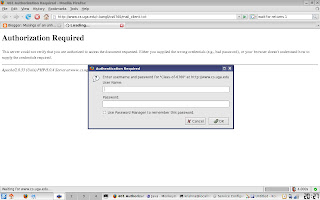
Like I mentioned in the previous posts, I have this requirement where I run tests using SWT Browser Widget on thousands of URLs. And I am start the test and leave the lab. But then for some URL, the SWT Browser just pops up a dialog either asking for password or warning about a bad certificate. This has been my biggest problem off late and has delayed my tests because unless you close the dialogs the program, the execution cannot move forward.(Like the one shown in the image)
I tried out various options like configuring the settings of Mozilla which is used by SWT Browser when the widget runs on Linux (It uses IE when is running on Windows). But this hasnt worked out.
Then I thought, in Linux if a window is created, there is some way that we can be notified about this. Like some kind of GNOME or a X window Events. So initially I thought I would write some program in C to capture these global events and then for those windows I want, I would close them as I get notified. But then unlike getting this idea, implementing it is not that simple. Even now I have no clue if I ever want to write such a program, then what should I start.
Anyways I browsed for a long time and found out about this wonderful new tool called "wmctrl" which does exactly what I want. With wmctrl I can get a list of open windows, their X Window ID, their title, their process IDs. And not only that we can manage a specific window using its ID or title and this includes opening, closing, resize, move, change title, etc. Isnt that great?
You can download it from "http://www.sweb.cz/tripie/utils/wmctrl/". Just install the tool on your machine using ./configure, make, make install and you are good to go.
Getting a list of open windows on Linux
In the command line, type in wmctrl -l to get a list of all open windows and their information. Example shown in the image.
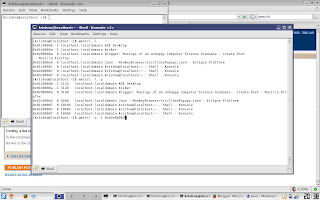
The other options are also shown. You can close a window by passing its ID (-i option) and a -c option.
You can close a window by just passing the title along with -c option.


But then the next problem is how am I going to execute this from a Java Program!
Executing Linux Commands from Java Program
You can run a Unix command from a Java Program, as shown below
try {
Process p = Runtime.getRuntime().exec("wmctrl -l -p");
int i = p.waitFor(); // very important. You wait for the command to be executed.
// i would be the return value of the process you are running.
if(i==0) //if successfully terminated
{
BufferedReader buff = new BufferedReader(new InputStreamReader(p.getInputStream()));
String temp;
while((temp=buff.readLine())!=null)
{
System.out.println(temp);
}
}
else //wmctrl returns 1 if no options passed
System.out.println("error : "+i);
} catch (IOException e) {
// TODO Auto-generated catch block
e.printStackTrace();
} catch (InterruptedException e) {
// TODO Auto-generated catch block
e.printStackTrace();
}

The above program executes wmctrl and displays the listing on the console. Isn't Java interesting to work and great?
I am just left with implementing this idea on my lab test machine and collect great results!!!!

Saturday, December 08, 2007

What next?

The semester is almost over. Two more exams and I will be done with the Fall 2008 semester at UGA. Looking back, one question that every student should probably ask himself is "Was I a good student?" By that I just mean what did I learn this semester? Well, I should say it was not the most inspiring semester I had in my student life, but definitely one of the hectic semester. I did learn a lot about simulation, especially parallel, distributed simulation, worked on my thesis to a great extent, participated in international capture the flag competition, attended an unsuccessful interview, realized that I am good but not good enough to become one of the best developers for a company. I developed a bad game, developed a great soccer simulator, developed a good library that can be used to develop P2P-ized applications, worked a lot on web crawling, evaluated a lot of "browser" frameworks, worked on SWT, worked on Silverlight, worked on VS 2008 Beta 2, taught a thing or two to my friends about .NET, read a lot about web security, read a lot of papers on simulation. Keeping all this in view I should say that it has been a very eventful semester. Things have been pretty bad on the personal front, but I guess thats the way I become more strong and better.
I really am looking forward for the next year. I hope it would be a totally different year and I hope it would be the way I want it to be. As a new year resolution, I plan to quit smoking right from the 31st. I know it is bad and I should not smoke.
Coming to the technical front, I have few holidays coming this month and I hope to work on the following.

You should see this presentation and would know why I chose these...
http://static.raibledesigns.com/repository/presentations/ComparingJavaWebFrameworks.pdf
1. Java Server Faces
2. Struts 2
3. Spring
4. Tapestry
5. Wicket, Stripes
6. Tiles, SiteMesh

I feel my resume is more of .NET and I really am not that bad at Java and neither am I that good at .NET. I really was good at .NET till 1.1 I used to know quite a lot of 1.1, be it asynchronous calls or anything else that complex, I was good at it. But not any more. .NET is now an ocean and my knowledge is really now very little. But the job front on Java Web looks more promising and it would probably add more value to my resume if i can develop applications on both JAva and .NET platforms. Let me see where my learning would go!

Saturday, February 09, 2008

Keyword Helper - My posts

Intention of this post is to give link to my posts for popular keywords

How to develop Groovy Programs in Eclipse

C# 3.5

Peer to Peer Programming [C# p2p Programming would be posted soon]

Image Processing in Java (Histogram, Grayscale to Color Image, etc)

StackOverflowException in Java - solution

Using SWT Browser

CapGemini 1st round interview

CapGemin 2nd round Interview

Free Screen Recording tools

Installing Audio Drivers on Linux

These keywords, I picked based on the Google Analytics Reports. I hope to improve traffic and at the same time make it easy for people who hit my website...lame idea I guess! ;)